Is Trust Wallet Safe? An Honest 2026 Security Review
Trust Wallet's mobile app is a reasonable self-custody wallet for everyday amounts: your keys are created and kept on your device rather than by the company, and neither of the two serious incidents in its record touched the phone app. Both hit the browser extension. The first was a seed-generation flaw found in 2022; the second was a malicious extension version, v2.68, pushed to the Chrome Web Store at Christmas 2025, which Trust Wallet says affected 2,520 addresses and about $8.5 million in assets.
So the honest answer is: safe enough as a mobile hot wallet if you follow the habits below, less comfortable as a browser extension, and not the place for savings you could not afford to lose. For a careful mobile user, the bigger day-to-day risks are scams, fake support and signed approvals, not flaws in the wallet. One disclosure up front: Trust Wallet pays us nothing, so this review earns us nothing either way.
Self-custody means you are the bank. Lose the recovery phrase and nobody can restore it; share it and anyone can empty the wallet. Crypto prices are volatile, and nothing here is financial advice.
Short answer: the app is self-custodial; the bigger risks are scams and approvals
Trust Wallet describes its security around a few controls: keys encrypted locally on your device, a passcode and biometrics to open the app, a Security Scanner that warns about known risk signals before you sign, and an optional Encrypted Cloud Backup stored in your own iCloud or Google Drive and decryptable only with a password you set (its safety article, published 13 Aug 2026). Trust Wallet says it cannot reset that password for you. Those are the right building blocks for a hot wallet.
What they cannot do is stop you from approving something harmful. A wallet signs what you tell it to sign, and an approval granted to a malicious contract or a recovery phrase typed into a fake form bypasses every protection listed above. That is why the scams section of this review matters more than the feature list, and why the incident history, while real, is not where most of the risk lives for a careful mobile user.
Who owns Trust Wallet, and why that matters
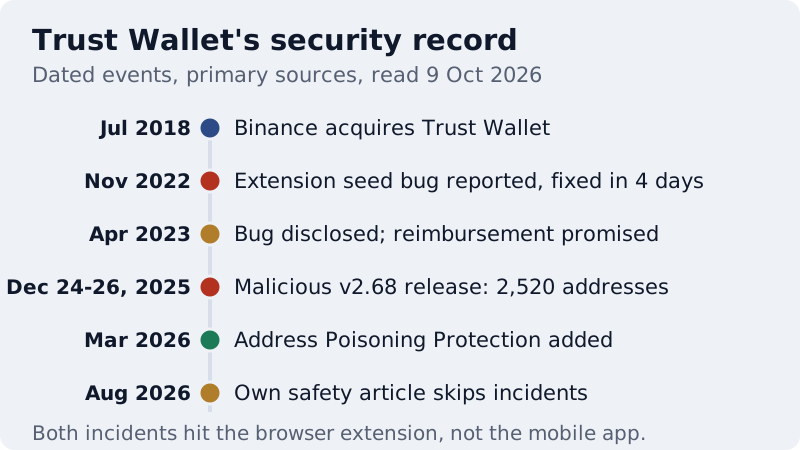
Binance acquired Trust Wallet on 31 July 2018, its first acquisition, for an undisclosed mix of cash, shares and BNB, as TechCrunch reported at the time. The connection is still visible: Trust Wallet's security page sends bug reports to a Bugcrowd programme listed as a Binance engagement. Ownership does not give Binance access to your coins in a self-custody wallet, because the keys sit on your device. It does mean the company that ships the app's code and updates is Binance-owned, which matters to anyone weighing corporate or regulatory exposure.
It is also worth knowing what Trust Wallet itself chooses to say. Its own "Is Trust Wallet safe?" article, published in August 2026, does not mention the Binance ownership, the auditors, the bug bounty or either past incident. None of that makes the wallet unsafe, but it is a reason to read independent sources, not only the vendor's, before you trust any wallet with real money.
Trust Wallet's incident timeline (dated and sourced)
2022: the extension seed-generation bug
Ledger's security team, which found the flaw, reported on 17 Nov 2022 through Binance's bug bounty that the WebAssembly build of Trust Wallet Core used by the browser extension generated seeds with only 32 bits of entropy, because it relied on a Mersenne Twister random-number generator that is not meant for cryptography. A fix was committed on 21 Nov 2022. Trust Wallet disclosed the issue on 22 Apr 2023, paid a $100,000 bounty and promised to reimburse stolen funds. Ledger's write-up estimated around $30 million was at risk early on; as Ledger competes with Trust Wallet, read that figure as the finder's estimate.
December 2025: the malicious v2.68 extension
On 24 Dec 2025 an unauthorised Trust Wallet browser extension, version 2.68, was published to the Chrome Web Store outside Trust Wallet's normal release process. Per Trust Wallet's community update (published 30 Dec 2025, updated 17 Jul 2026), users who opened or logged in to that version between 24 and 26 Dec were exposed; 2,520 wallet addresses were affected and about $8.5 million in assets impacted, and the extension was safe again after 11:00 UTC on 26 Dec. The mobile app and other extension versions were not affected.
Trust Wallet says it has high confidence the incident is linked to the November 2025 Sha1-Hulud supply-chain attack, which exposed a Chrome Web Store API key. It fixed the problem by re-releasing the clean v2.67 code as v2.69, and it is voluntarily reimbursing affected users through a claim form, case by case. It reported receiving more than 5,000 claims, many of them likely duplicates or fraudulent. The post sits in the company category of Trust Wallet's blog rather than its security category, which is why many users never saw it.
If you used the extension in that window, treat the recovery phrase it held as exposed. Create a new wallet with a new phrase, move whatever remains, and file any claim only through Trust Wallet's official support site, typed in yourself. Fake claim pages and fake "reimbursement agents" are exactly what scammers build after incidents like this one.
What protects you, and what doesn't
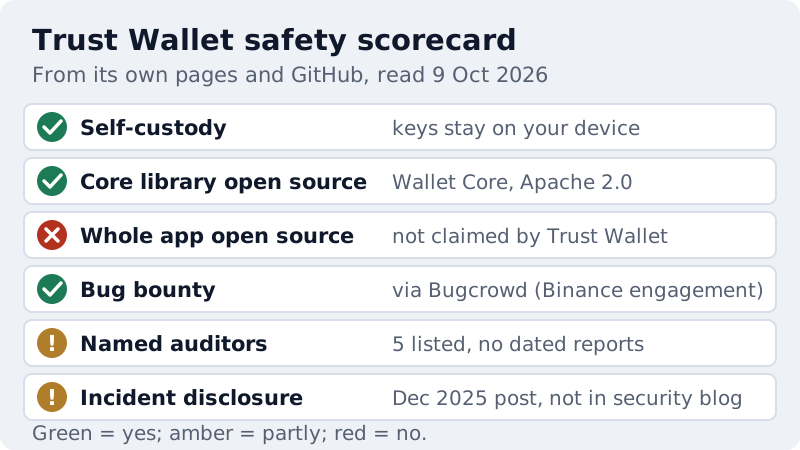
On the protective side, self-custody is the big one: there is no company balance to freeze or to lose in a bankruptcy. The core cryptographic library, Wallet Core, is open source under the Apache 2.0 licence on GitHub, so outsiders can inspect how keys are derived and transactions signed. Trust Wallet runs a bug bounty and names five auditors on its security page: CertiK, Cure53, Halborn, Kudelski Security and Quantstamp. Since 10 Mar 2026 the app also screens destination addresses for poisoning on 32 EVM chains.
The limits are just as concrete. The full app is not described as open source, so you are trusting the company for everything outside Wallet Core. The security page lists auditors without dated reports or scopes, so you cannot tell what was audited or when. And no wallet feature protects a recovery phrase you type into the wrong place, an approval you sign without reading, or a phone already infected with malware.
| Mobile app | Browser extension | |
|---|---|---|
| Dec 2025 v2.68 incident | Not affected | Users who opened v2.68 on 24-26 Dec 2025 were exposed |
| 2022 seed-generation bug | Not the build Ledger flagged | Wallets created with the extension's WebAssembly build |
| Official install source | App Store, Google Play, Trust APK via trustwallet.com | Chrome Web Store link from trustwallet.com |
| Main day-to-day threats | Fake apps, fake support, signed approvals | Malicious sites, signed approvals, extension supply chain |
Trust Wallet scams: fake apps, fake support, approval drainers
Fake apps come first because they are the cheapest trick. Trust Wallet's download page says to install only from the official links on trustwallet.com, with the publisher shown as Trust Wallet; a lookalike in an app store or an ad is built to collect your recovery phrase the moment you import it. Fake support comes next: real support never asks for a recovery phrase, never needs you to "validate" or "sync" a wallet on a website, and does not open conversations with you in replies or direct messages.
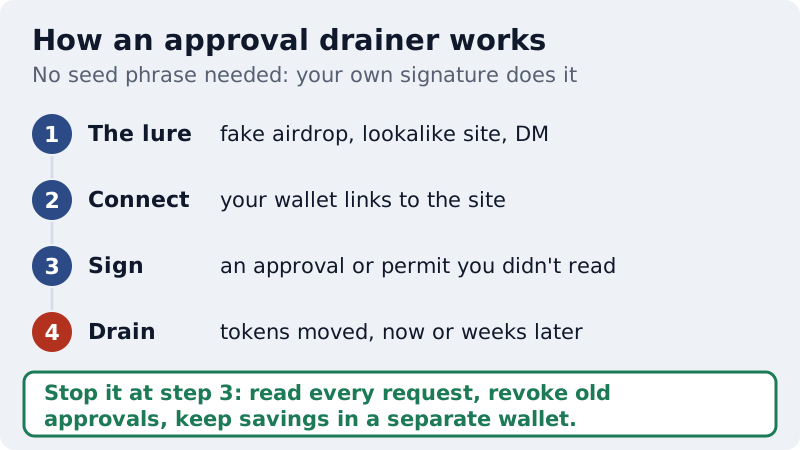
Approval drainers are the subtler threat. You connect to a site, sign what looks like a routine request and grant a contract permission to move your tokens, which it can use immediately or weeks later. No recovery phrase changes hands. Address poisoning is a cousin of this: an attacker sends a tiny transfer from an address that looks like one you use, hoping you copy it from your history next time. Trust Wallet says it has detected more than 225 million poisoning attacks, with more than $500 million confirmed stolen; those are its own figures, but the pattern is real. Our deeper guide to wallet drainers and approval scams shows how to revoke approvals.
Setting up Trust Wallet safely: 7 checks
- Install from trustwallet.com's own links, and confirm the publisher is Trust Wallet before you tap install.
- Prefer the mobile app for everyday use, and if you use the extension, keep it updated and check the version.
- Record the recovery phrase on paper or metal, offline, never in a photo, a note app or a cloud document.
- If you enable Encrypted Cloud Backup, use a strong, unique password; Trust Wallet cannot reset it for you.
- Turn on the app passcode and biometrics, and keep your phone's operating system up to date.
- Read the Security Scanner warnings and every approval before signing, and revoke approvals you no longer need.
- Copy addresses from the source, not your history, and send a small test before any large transfer.
None of these steps is specific to Trust Wallet, which is the point: habits decide most outcomes in self-custody. For the recovery-phrase side in more depth, see seed-phrase security and scams, and for phone versus extension trade-offs across wallets, our mobile versus browser wallet safety guide.
Trust Wallet vs MetaMask vs Exodus for safety
All three are self-custody wallets, so the biggest safety factor is the same for each: how you guard the recovery phrase and what you sign. The differences are mostly about fit and surface area. Trust Wallet's breadth across many chains is convenient, but every extra chain and in-app swap is another place to make a mistake, and a wallet that does fewer things gives you fewer of them. None of the three pays us. Our MetaMask vs Trust Wallet vs Exodus comparison covers features and fit; the best crypto wallets ranked on security and custody puts them in the wider field.
If your Trust Wallet has been drained
Act in this order. Move anything left to a brand-new wallet with a new recovery phrase, created on a device you trust, because the old phrase or old approvals may still be live. If the loss came through a signed approval rather than a leaked phrase, revoke the approval too, since it can be reused against tokens you still hold in that wallet. Then write down the transaction IDs, addresses and times while you still remember them.
In the US, report it at ic3.gov, the FBI's central hub for internet and crypto fraud; IC3 says it will never contact you directly asking for money or information, so anyone claiming to be from IC3 is not. Expect a second wave of contact from "recovery" firms promising to trace and return your coins for a fee. IC3's 2025 figures put fake fund-recovery outfits at 10,516 complaints and $1.4 billion taken from victims. Nobody can reverse a confirmed transfer, and a request for an upfront fee is the scam announcing itself.
When to move to a hardware wallet
Move savings off any hot wallet once losing it would genuinely hurt, or once you are holding for the long term rather than using the coins. A hardware wallet keeps the keys on a separate device, so a compromised phone or browser cannot sign on its own. It does not make you immune: you can still approve a malicious transaction on the device, and hardware makers have their own incident histories, such as Ledger's Connect Kit supply-chain attack in Dec 2023 and a phishing email sent through Trezor's newsletter provider in Sept 2026.
A sensible split is a hot wallet such as Trust Wallet for small, active balances and a hardware wallet for the rest. The mainstream options we link to are Ledger, Trezor and, for a lower-cost device with its own app, SafePal. In the US, Trezor lists the Safe 3 at $59, Ledger the Nano S Plus at $69 and SafePal the S1 at $49.99 (read 10 Oct 2026); prices change, so check the shop on the day you buy. Each of those three links is an affiliate link that can earn us a commission; Trust Wallet pays us nothing, and we would give the same advice if none of them paid. For timing and the migration steps, see when to move to a hardware wallet.
Is Trust Wallet safe? Common questions
Is Trust Wallet safe?
Who owns Trust Wallet?
Was Trust Wallet hacked?
Does Trust Wallet support ever message you first?
Should I keep all my crypto in Trust Wallet?
Next: see how the options stack up in our guide to the best crypto wallets, ranked on security and custody, or read hot wallet vs cold wallet to know when to move to cold storage.