Is Coinbase Wallet Safe? What Changed With the Base App
Coinbase Wallet is a self-custody wallet, and on that basis it is reasonably safe for everyday amounts. Coinbase's 2025 annual report says users have sole control of the keys, which are stored on their own devices or personal storage accounts rather than with Coinbase. That makes it a different product, with different risks, from the Coinbase exchange app, where Coinbase holds your crypto for you.
It suits people who like the Coinbase brand but want to hold their own keys, and who will look after a backup. It does not suit anyone who wants a company to reset access if they lose a phone and a password, and it is not where to keep savings you cannot afford to lose. Be aware, too, that the app now pitches trading in stocks, perpetual futures and prediction markets; those products carry their own risks, which the custody model does nothing to reduce. Coinbase Wallet pays us nothing.
Holding your own keys means nobody can freeze your coins, and nobody can rescue them either. Crypto is volatile and not insured by any government. This is education, not financial advice.
Short answer and the naming: Coinbase app vs Coinbase Wallet vs Base App
Three names cause most of the confusion. The Coinbase app is the exchange: an account where Coinbase holds the crypto and you log in with a password. Coinbase Wallet is a separate app for self-custody, where you hold the keys. In 2025 Coinbase relaunched that wallet as the Base App, in open beta during the second quarter, per its Q2 2025 shareholder letter. By October 2026 the name had swung back: Coinbase's developer documentation now refers to "Coinbase Wallet (formerly known as Base App)", and base.app redirects to wallet.coinbase.com, titled "Coinbase Wallet — Built To Trade".
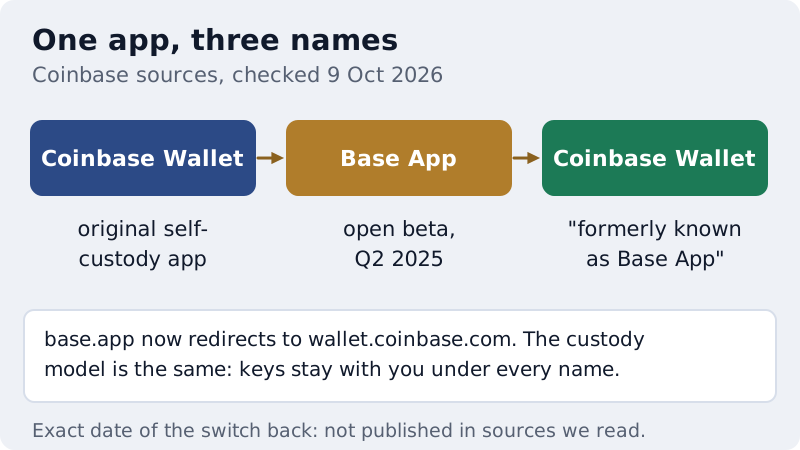
We could not find a published date for the switch back, and Coinbase's investor site still lists "Wallet" and "The Base App" as separate entries, so articles written in late 2025 that call it the Base App are describing the same product. Whatever the name on the icon, the safety question is the same one: you hold the keys, so the backup and the approvals are yours to manage.
Custody model: who holds the keys
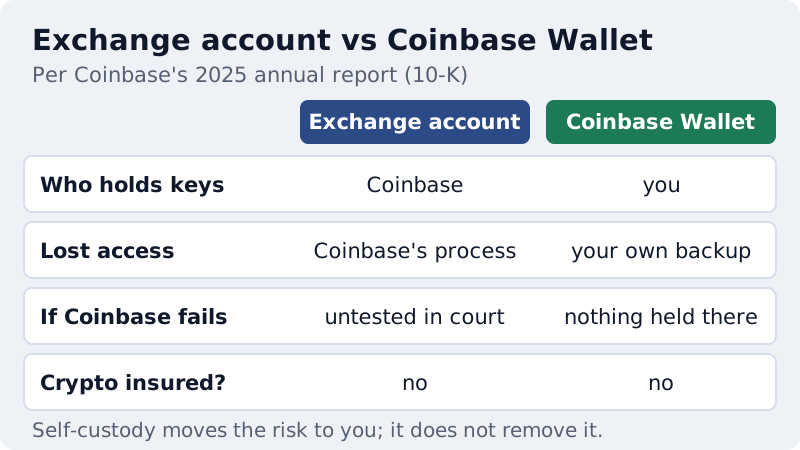
In the wallet, the keys are generated and kept on your side. Coinbase's 10-K, filed in February 2026, says wallet users have sole control over the cryptographic keys, stored on their mobile devices or personal storage accounts and not with a centralised entity, and that users can optionally add a recovery signer to regain access. Coinbase cannot move your wallet funds, and if Coinbase the company ran into trouble, there would be no balance of yours on its books to be caught up in it.
The exchange account works the other way round. For the exchange, Coinbase reports one-to-one holdings of customer assets and a target of at most 2% of custodied crypto in hot wallets, and keeps US customers' cash at FDIC-insured banks or money-market funds; crypto itself is not insured or guaranteed by any government. It also says its user agreements treat customer crypto under UCC Article 8, so that it is not Coinbase's property, while admitting courts have not yet tested that for custodied crypto. Neither model is risk-free; they move the risk to different people.
Recovery options: recovery phrase, personal backup, recovery signer, passkey
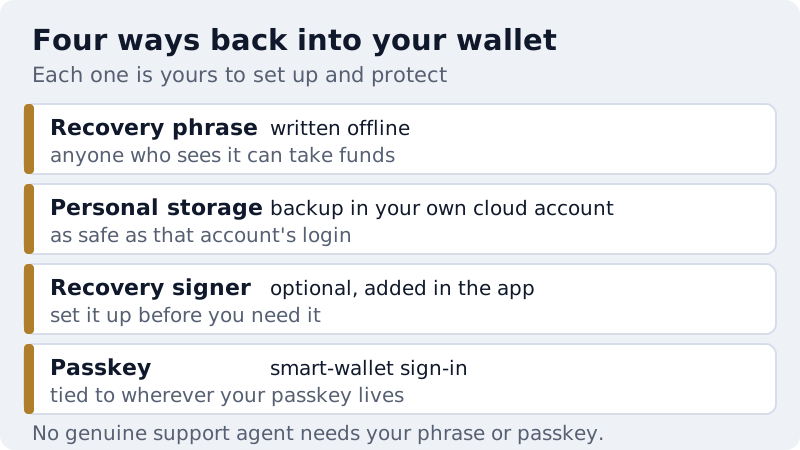
Coinbase Wallet offers more than one way back in, and each puts the job on you. The classic route is a recovery phrase written down offline: lose it and the funds are gone; let anyone else see it and they can take them. The 10-K describes keys held in personal storage accounts, meaning a backup kept in your own cloud account, which is only as strong as that account's password and two-factor setup. We could not read Coinbase's help page on how that backup is encrypted, so we make no claim about it beyond Coinbase's filing.
Two newer options sit alongside. The optional recovery signer, mentioned in the 10-K, lets you add a way to regain access, and it only helps if you set it up before something goes wrong. And Coinbase's smart-wallet sign-in uses passkeys: its developer docs say one passkey works across every Base-enabled app, with no seed phrases to handle. That removes the paper-phrase problem but ties your access to wherever the passkey is stored, so protect that account as carefully as you would protect a phrase.
Security record and known risks
We found no breach specific to Coinbase Wallet in the sources we checked, which is not proof that none has occurred. The incident that matters to wallet users happened on the exchange side. In May 2025 Coinbase disclosed that support contractors and employees outside the US had been bribed to take customer data; no passwords or private keys were taken, and the insiders could not access funds (8-K, filed May 2025). Coinbase paid $311.2 million in cash in 2025 related to the incident, covering voluntary customer reimbursements and direct legal costs, per its 10-K.
The stolen data was then used for social engineering: calls and texts from fake Coinbase staff telling people their account was at risk and that they should move funds to a "safe" wallet the caller controlled. In IC3's 2025 data, fake tech and support schemes tied to crypto drew 17,355 complaints and $1.226 billion in reported losses. For a self-custody user, the lesson is direct: treat anyone who calls first, asks for your recovery phrase or says your coins must go to a new wallet as a scammer. Hang up and open the app yourself.
The other risks are the usual hot-wallet ones. Signing a malicious approval can drain tokens without any phrase changing hands, which our guide to wallet drainers and approval scams covers in detail. Lookalike apps and sites target every big brand. And the trading features now promoted on the wallet's homepage, stocks, perpetual futures and prediction markets, can lose money quickly in ways that have nothing to do with key security.
Fees inside the wallet: swaps and transfers
Holding crypto in a self-custody wallet costs nothing, but moving it does. Each on-chain transfer pays a network fee, which depends on the chain and how busy it is. Swaps inside the wallet carry a Coinbase fee on top of network costs; we could not confirm the current percentage from a Coinbase page, so we do not print one, and older figures you may see quoted elsewhere may be out of date. The wallet shows the fee before you confirm, and the useful habit is to compare the amount you will receive against another route for the same swap.
Setting up Coinbase Wallet safely
- Install it from wallet.coinbase.com or the official app-store listing reached from there, not from an ad.
- Choose your recovery method deliberately: a phrase written on paper or metal, a personal backup, a recovery signer, or a passkey, and know where each one lives.
- Secure the accounts behind it, such as the cloud account or password manager holding a backup or passkey, with a strong password and two-factor authentication.
- Keep it separate from your exchange login in your head: the exchange password does not unlock the wallet.
- Read every approval and signature request, and revoke approvals you no longer use.
- Send a small test before any large transfer, and copy addresses from the source each time.
A seventh point is a judgement call rather than a setting: decide in advance what you will and will not use the trading features for. Self-custody does not limit losses from leveraged products. For the backup side in depth, see how to back up a crypto wallet, and for the difference between the two kinds of account, our explainer on whether a crypto wallet is the same as an exchange.
When the Coinbase exchange account is the better fit
Self-custody is not automatically the right answer. If you would rather not manage a backup at all, want a company you can contact to restore access after losing a phone, and accept that the company holds your crypto, a regulated exchange account is the simpler choice. Coinbase is the obvious one for readers already in its ecosystem; it holds New York virtual-currency and money-transmitter licences from NYDFS and a MiCA authorisation in the EU through Coinbase Luxembourg (both checked 9 Oct 2026). If that is you, open a Coinbase account and secure it with strong two-factor authentication. That is an affiliate link and may earn us a commission, which does not change the custody trade-off above. Our page on custodial vs non-custodial wallets sets out that choice in full.
Affiliate link — we may earn a commission at no cost to you. It never changes what we recommend, and the wallets we rate highest mostly pay us nothing.
When a hardware wallet is the better answer
Once your balance would genuinely hurt to lose, keep the bulk of it on a hardware wallet and leave only spending money in Coinbase Wallet or any other hot wallet. A hardware device keeps the keys off your phone, so malware or a phished browser session cannot sign alone. It still cannot stop you from approving a bad transaction on the device, so the reading-before-signing habit travels with you. The mainstream choices we link to are Ledger and Trezor (affiliate links); Trezor's US list prices are $59 for the Safe 3 and $129 for the Safe 5, and Ledger's are $69 for the Nano S Plus and $99 for the Nano X (read 10 Oct 2026). For timing and migration, see when to move to a hardware wallet, and for the full field, the best crypto wallets ranked on security and custody.
Coinbase Wallet safety questions
Is Coinbase Wallet safe?
What is the difference between Coinbase and Coinbase Wallet?
Is Coinbase Wallet the same as the Base App?
Can Coinbase recover or freeze my Coinbase Wallet?
How do I find my Coinbase Wallet address?
Next: see how the options stack up in our guide to the best crypto wallets, ranked on security and custody, or read hot wallet vs cold wallet to know when to move to cold storage.