How to Find Your Bitcoin Wallet Address (and Send BTC Safely)
To find your bitcoin wallet address, open the wallet or exchange app that holds your bitcoin, pick bitcoin, and tap Receive (some exchanges call it Deposit). The app shows a string of letters and numbers starting with 1, 3, bc1q or bc1p, plus a QR code; that string is your address, and you can share it safely because it only lets people pay you. If you use a hardware wallet, confirm the same address on the device's own screen before you hand it out.
Sending is where money goes missing, so this guide spends most of its time there. Bitcoin payments cannot be reversed. A swapped address, a lookalike copied from your history or the wrong network can cost you the whole amount, and there is no bank to call. Below you'll find the four address formats side by side, a five-step safe-send routine, and an honest table of which mistakes can be undone.
What a bitcoin wallet address is, and why you get a new one each time
A bitcoin wallet address is a public destination for payments. Think of it as an account number you can print on an invoice, except that it is generated by your own wallet rather than issued by a bank. Behind it sits a private key that only your wallet holds; the address is derived from that key, and nobody can work backwards from the address to the key. That is why sharing the address is fine and sharing your recovery phrase never is.
Most modern wallets show a fresh address every time you press Receive. They are all generated from the same recovery phrase, so every one of them belongs to you and lands in the same balance. The reason is privacy: the bitcoin ledger is public, and reusing one address lets anyone who knows it see every payment you have ever received there. Old addresses keep working, so a payment sent to yesterday's address still arrives, but handing out a new one each time is the better habit.
A wallet, in turn, is just the software or device that manages those keys for you. If the distinction between holding keys yourself and letting an exchange hold them is new, our guide to custodial and non-custodial wallets explains what changes when something goes wrong.
The four bitcoin address formats side by side
You can tell an address's type from its first characters. All four formats are valid today and any up-to-date wallet can send to all of them, but they differ in age, in how much block space they use when you later spend from them, and in how well they catch typing mistakes.
| Starts with | Name | Defined in | What to know |
|---|---|---|---|
| 1 | Legacy (P2PKH) | Original format, version byte 0 | Accepted everywhere; uses the most block space to spend from |
| 3 | Script hash (P2SH), often wrapped SegWit | BIP-13 (version byte 5) | Used for multisig and older SegWit wallets |
| bc1q | Native SegWit (Bech32) | BIP-173, witness version 0 | Lowercase only; its checksum detects any error of up to 4 characters |
| bc1p | Taproot (Bech32m) | BIP-350 and BIP-341 | Newest format; Taproot activated at block 709,632 |
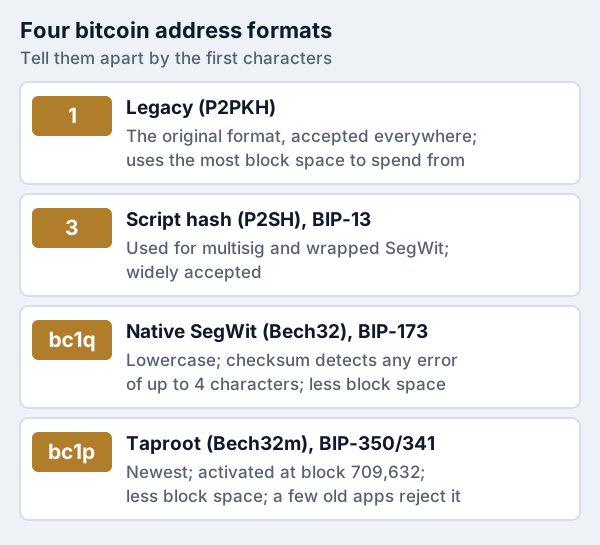
On fees, the honest summary is qualitative. SegWit (bc1q) and Taproot (bc1p) inputs take up less block space than legacy ones, so spending coins held at those addresses usually costs less in network fees. None of the protocol documents puts a fixed percentage on the saving, because the fee you pay depends on the whole transaction and on how busy the network is, so we don't quote one either.
The Bech32 formats have a second advantage that matters for this guide: they were designed to catch mistakes. BIP-173 specifies a checksum that always detects an error touching up to four characters, and BIP-350 fixed a weakness in that scheme for Taproot addresses. Legacy and script-hash addresses carry a checksum too, so a random typo is almost always rejected. What no checksum can catch is a different but valid address, which is exactly what scammers supply.
How to find your address in common wallets and exchanges
The menu names vary, but the route is almost always the same: open the app, select bitcoin (not a wrapped version of it on another network), and choose Receive. What differs is what you should check before you share what appears.
Phone or desktop wallets. Tap Receive and pick bitcoin. Many wallets let you choose the address type; bc1q is the safest default because every current wallet and exchange can send to it. Copy the address with the app's copy button or show the QR code. Our best crypto wallets page compares the main software options.
Hardware wallets. Open the companion app, choose your bitcoin account and press Receive. The app shows an address on your computer or phone, and the device shows it too. The device screen is the one to trust, because malware on a computer can change what the app displays. Trezor's support pages tell owners to verify the address character by character on the hardware itself before using it.
Exchanges. Look for Deposit or Receive inside your bitcoin balance. Exchanges often ask you to pick a network as well; for bitcoin coming from an ordinary wallet, choose the Bitcoin network itself. Exchange deposit addresses can change over time, so collect a fresh one from the app every time rather than reusing an address from an old email or screenshot.
Finding an address for a payment someone sent you. If you need to prove which address received a payment, open the transaction in your wallet's history; it lists the receiving address and a transaction ID you can paste into any block explorer.
How to send bitcoin to another wallet, step by step
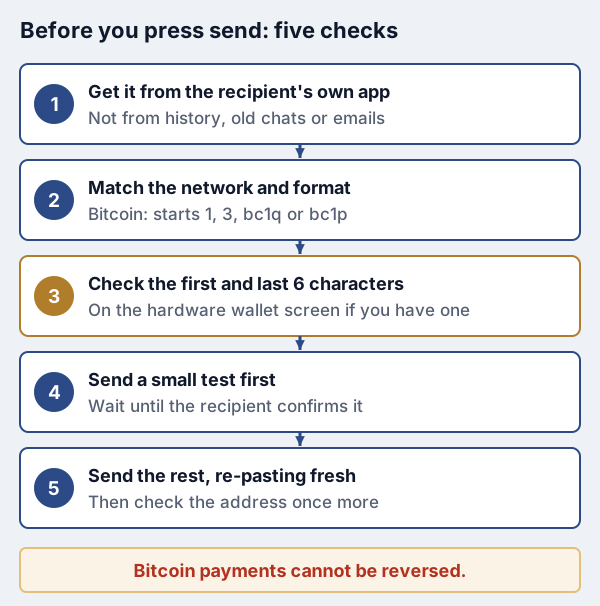
Sending is the mirror image of receiving, with every risk sitting on your side. Follow the same routine whether you are moving $50 or your savings; habits only protect you if you never skip them.
- Get the address straight from the recipient's app. Ask them to copy it from their Receive screen and send it through a channel you trust, or scan their QR code in person. Never take it from an old chat, an email signature or your own transaction history.
- Match the network and format. A bitcoin address on the Bitcoin network starts with 1, 3, bc1q or bc1p. If the recipient's exchange gave them something else, stop and ask which network they expect.
- Paste, then check the first and last six characters. Compare them against the recipient's copy, ideally by reading them aloud. On a hardware wallet, do the comparison against the device screen.
- Send a small test first. For anything you would hate to lose, send a small amount and wait until the recipient confirms it arrived.
- Send the rest, re-pasting the address fresh. Copy it again from the recipient's original message rather than from your history, then check it one more time before you confirm.
If you are paying from an exchange rather than a wallet you control, the same routine applies; the exchange simply adds a withdrawal screen and, often, a network fee it shows before you confirm. A hardware wallet adds the strongest version of step three, because the address you approve is the one displayed by a device malware cannot rewrite. A Trezor or Ledger device does this for bitcoin (we may earn a commission; it doesn't change what we recommend), and our page on when to move to a hardware wallet helps with the timing.
Address poisoning and clipboard malware: how they work
Two scams target the moment between copying an address and pressing send. Neither breaks bitcoin's cryptography; both rely on people trusting what they see on a screen without checking it.
Clipboard malware sits quietly on an infected computer or phone and watches what you copy. When it sees something that looks like a crypto address, it swaps in the attacker's address at the moment you paste. Everything else about the payment looks normal. The defence is the check in step three: compare the pasted address against the original, and on a hardware wallet compare against the device screen, which the malware cannot alter.
Address poisoning plants a lookalike in your history. The attacker generates an address that shares its first and last few characters with one you use, then sends you a tiny or zero-value transfer from it so that it shows up in your transaction list. Next time you copy a familiar-looking address from history, you may copy theirs. Trezor describes this as a scam aimed mainly at Ethereum and other EVM chains such as BNB Smart Chain and Polygon, where zero-value and fake-token transfers are cheap to send, so it is a smaller threat on bitcoin itself; the habit that stops it, never copying from history, works everywhere.
When Trust Wallet launched a poisoning filter in March 2026, it put the number of attempts it had spotted above 225 million, a company figure nobody has independently checked. For the broader picture, the FBI's Internet Crime Complaint Center logged 181,565 complaints involving cryptocurrency in 2025, with reported losses of $11.366 billion. Our guide to drainers and approval scams covers the related attacks that empty wallets without touching an address at all.
Wrong network, wrong format: what's recoverable
Some mistakes are caught before any money moves; some can be fixed with help; some are final. Knowing which is which tells you whether to spend a weekend on support tickets or to report a crime and move on. This is general information about how bitcoin works, not a promise that any company will help in your case.
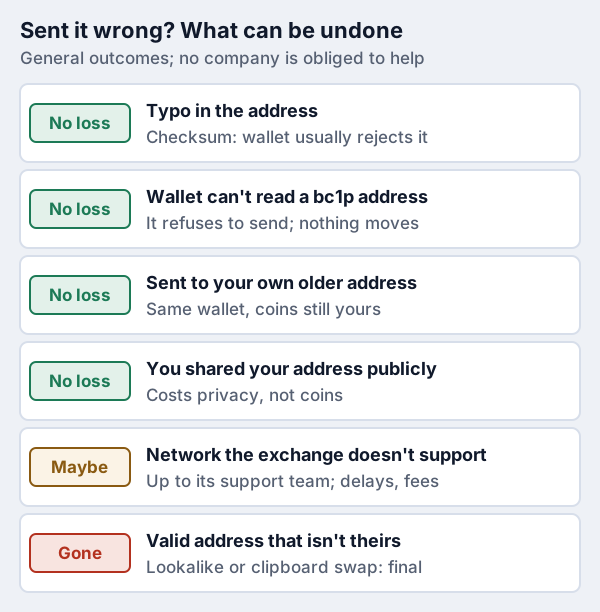
The 'maybe' row deserves detail. Exchanges increasingly list several networks for the same asset, and choosing one the receiving side does not watch can leave a payment stranded. Whether it can be retrieved depends on whether the receiver controls keys on that network and is willing to do the work, which can take weeks and may cost a fee. Treat it as a favour you can ask for, not a right.
The 'gone' row is the one to fear. A payment to a valid address belongs to whoever holds that address's key. You can report it at ic3.gov in the US and to the exchange you sent from, which may help investigators, but report quickly and be wary: anyone who contacts you offering to recover the coins for an upfront fee is running a second scam.
Privacy: address reuse and bitcoin wallet address lookups
Every bitcoin transaction is public. Paste any address into a block explorer and you can see its balance and every payment in and out, which is what people mean by a bitcoin wallet address lookup. You cannot see a name, but the trail is permanent, and once an address is linked to you, by an exchange record, a public donation page or a payment to a merchant, everything that touches it is linked too.
That is why reuse matters. A single address on a tip jar tells the world your total takings. A fresh address per payment, which most wallets generate automatically, keeps payers from seeing each other's transactions or your full balance. Watch-only tools work the same way in reverse: they can display any address, so seeing an address in an app proves nothing about who owns it.
Lookups also help you. Before you send to a business, a public explorer can confirm that an address has a history consistent with what you were told; after you send, it shows when your transaction confirmed. What a lookup can never do is identify a scammer by name, whatever a paid 'tracing' service promises.
Buying and sending bitcoin instantly
Searches for ways to buy and send bitcoin instantly with no verification turn up services we won't recommend. Without an identity check there is usually no one accountable if a payment goes astray, and scammers favour such services for the same reason. A mainstream exchange asks for ID first; that delay is the price of having a company to complain to.
The safest fast route for most people is to buy on a regulated exchange and withdraw to a wallet address collected fresh from your own app, using the routine above. Coinbase is one option for US buyers (we may earn a commission). Our piece on how wallets differ from exchanges sets out what you give up by leaving coins on the exchange instead. Bitcoin's price swings hard in both directions, and money you buy it with can shrink a long way or vanish entirely.
Edge cases worth knowing before you send
A few situations trip up even careful people. None of them is common, but each has cost someone a payment.
- Lightning invoices are not addresses. A Lightning payment request starts with lnbc and expires; it only works with a wallet that supports Lightning.
- Uppercase bc1 addresses. Bech32 addresses are case-insensitive but must not mix cases; an all-caps version in a QR code is valid, while a mixed-case one is an error.
- Testnet addresses look similar. Addresses starting with tb1 belong to the test network and hold nothing of value; never send real bitcoin to one.
- Wrapped bitcoin on other chains. Tokens that track bitcoin on Ethereum or elsewhere use that chain's addresses, usually starting 0x. They are not bitcoin addresses, and moving them falls under the other chain's rules.
- Recovering from your phrase. If you restore your recovery phrase into a different wallet and the balance looks empty, the new wallet may be checking a different address type; select the matching type rather than assuming the coins are gone. Our backup guide covers testing a restore safely.
Bitcoin wallet addresses: quick answers
How do I find my bitcoin wallet address?
What does a bitcoin address look like?
Is it safe to share my bitcoin wallet address?
Can I look up who owns a bitcoin address?
What happens if I send bitcoin to the wrong address?
Next: see how the options stack up in our guide to the best crypto wallets, ranked on security and custody, or read hot wallet vs cold wallet to know when to move to cold storage.